Passkeys satisfy Microsoft Entra’s definition of phishing-resistant MFA. That matters for Conditional Access because it means you can write policies that require phishing-resistant methods - and passkeys will meet that requirement without any extra configuration.
Authentication strengths
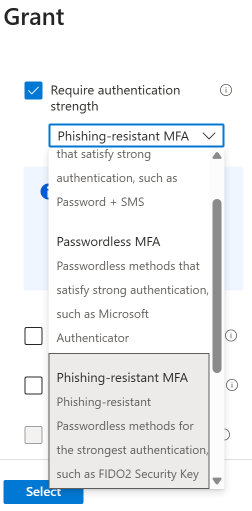
Entra’s Authentication Strengths feature lets you define which authentication methods satisfy a given Conditional Access policy. There are three built-in strengths:
- MFA strength - any MFA method (password + SMS, Authenticator push, etc.)
- Passwordless MFA strength - passwordless methods (Authenticator passwordless, FIDO2, Windows Hello)
- Phishing-resistant MFA strength - only phishing-resistant methods (FIDO2 security keys, passkeys, certificate-based auth)
For a passkey deployment, the one you care about is Phishing-resistant MFA strength. When you assign this to a Conditional Access policy, users must authenticate with a method from that category - a password plus SMS will not satisfy it, even if the user has those enrolled.
Building the policy
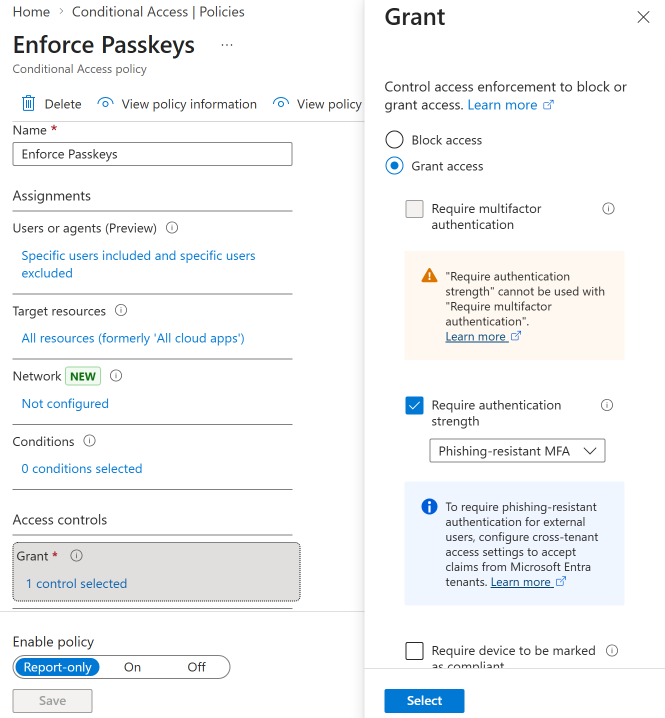
1. Start with a targeted policy. Scope it to your pilot group - the same group you enabled passkey registration for. Require phishing-resistant MFA strength for all cloud apps.
2. Use report-only mode first. This lets you see who would be blocked without actually blocking them. Run it for a week and review the sign-in logs for failures.
3. Exclude break-glass accounts. Your emergency access accounts should not be subject to this policy. They need a separate, well-documented authentication path.
4. Move to enforced mode. Once your pilot group is fully enrolled and report-only shows clean results, switch the policy to “On.”
5. Expand scope gradually. Add groups to the policy as they complete passkey enrollment. Don’t go org-wide until your helpdesk recovery process is tested and documented.
The gap to watch
A Conditional Access policy that requires phishing-resistant MFA does not remove weaker methods from a user’s account. It only controls what method is accepted at sign-in for resources covered by that policy. If you have applications or scenarios not covered by the policy, users might still authenticate with a password.
This is where downgrade attacks become relevant. The Conditional Access policy is a critical piece, but it’s not the whole picture - you also need a plan to retire legacy credentials over time.
Custom authentication strengths
If the built-in phishing-resistant strength is too broad or too narrow, you can create custom authentication strengths. For example:
- FIDO2 hardware keys only for privileged admin accounts - excludes Authenticator passkeys
- Any phishing-resistant method for standard users - includes all passkey types plus certificate-based auth
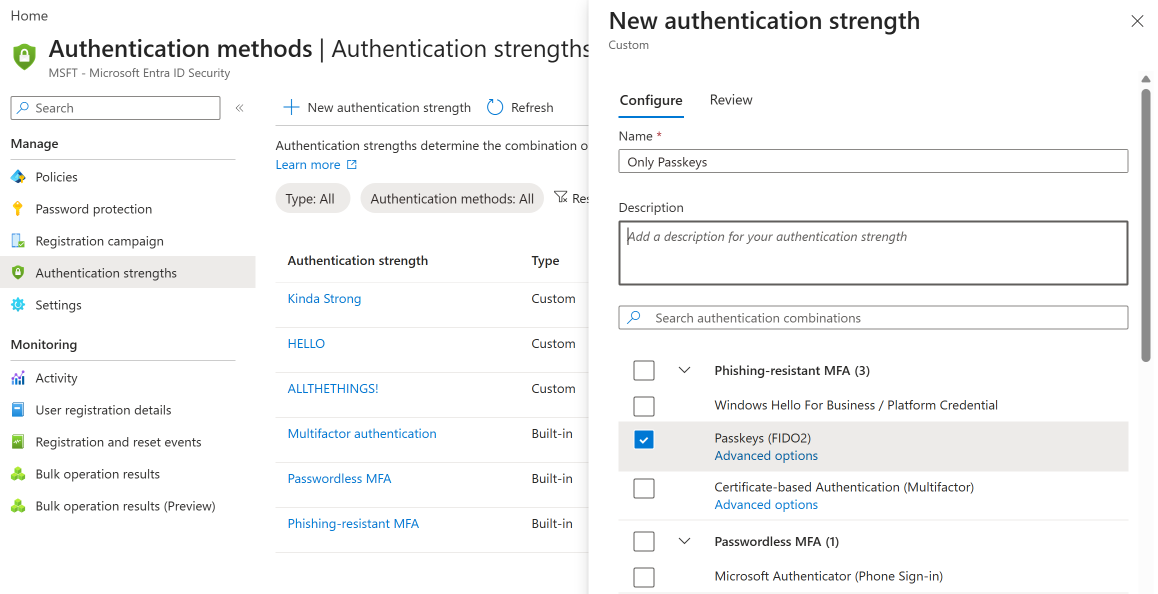
This pairs well with attestation and AAGUID allowlists - you can control both which hardware can register and which methods satisfy your policies.
Named locations and device compliance
Conditional Access policies for passkeys can be combined with other conditions:
- Named locations - require phishing-resistant MFA for external access, allow standard MFA for trusted office networks (though phishing-resistant everywhere is the stronger posture)
- Device compliance - require both a compliant device and phishing-resistant MFA for access to sensitive applications
- Application filters - apply the policy only to specific apps that require the highest assurance
Monitoring enforcement
After enabling a policy, monitor these in the Entra sign-in logs:
- Failure reason: “Authentication strength not satisfied” - users who attempted to sign in with a method that doesn’t meet the policy
- Conditional Access policy: Report-only failure - users who would have been blocked (in report-only mode)
- Authentication method used - verify users are actually using passkeys, not falling back to other methods
Review these logs weekly during rollout and taper to monthly once enrollment stabilizes.