Passkeys are phishing-resistant by design. But that doesn’t matter if an attacker can simply ignore the passkey and target a weaker method on the same account.
How downgrade attacks work
A downgrade attack exploits the fact that most accounts have multiple authentication methods enrolled simultaneously. During a passkey transition, a typical user might have:
- A passkey (phishing-resistant)
- A password (phishable)
- SMS-based MFA (interceptable)
- Authenticator push notifications (fatigue-bombable)
An attacker doesn’t need to beat the passkey. They just need to use the password and phish the MFA code, or bombard the user with push notifications until they approve one. The passkey is irrelevant because the attacker never triggers it.
The authentication chain is only as strong as its weakest enrolled method.
Real-world attack flow
Here’s how this plays out:
- Attacker obtains the target’s password (breach database, phishing page, infostealer)
- Attacker initiates sign-in at the legitimate Microsoft login page
- Microsoft prompts for MFA - the attacker gets a prompt for whatever MFA methods are available
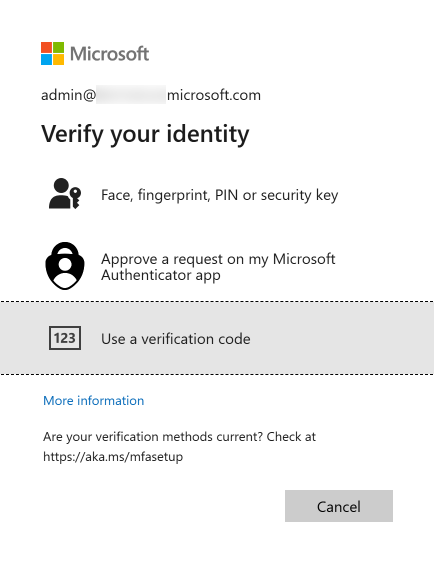
- If SMS is enrolled: attacker performs a SIM swap or intercepts the code via SS7
- If push is enrolled: attacker triggers push notifications repeatedly until the user approves (MFA fatigue)
- If the attacker uses an AiTM proxy: they capture the session token in real time, bypassing MFA entirely
- Attacker has a valid session - the passkey was never involved
The user has a passkey. The user could have signed in with the passkey. But the attacker chose to authenticate with the password, and the system allowed it because the password was still a valid method.
Why this matters for your deployment
If you deploy passkeys but leave passwords and weak MFA methods in place, you’ve added a secure option without removing the insecure ones. Your actual security posture hasn’t changed - it’s determined by the weakest method, not the strongest.
The most common mistake in passkey deployments is treating enrollment as the finish line. It’s the starting line.
Mitigations
During transition: Conditional Access authentication strengths
You can’t remove passwords on day one, but you can reduce the downgrade surface using Conditional Access authentication strengths:
- Create a policy requiring Phishing-resistant MFA for all cloud apps
- Scope it to users who have completed passkey enrollment
- This forces the sign-in to use a passkey (or other phishing-resistant method) even if weaker methods are still enrolled
This doesn’t prevent an attacker from trying the password, but it prevents the password from being accepted for resources covered by the policy.
Limitation: this only covers resources targeted by the CA policy. If the attacker finds a resource or flow not covered by the policy, the password still works there.
After transition: remove legacy credentials
The real fix is removing the weaker methods:
- Disable password authentication for users who are fully enrolled in passkeys
- Remove SMS/phone MFA from user accounts
- Disable Authenticator push in favor of passkey-only Authenticator
- Revoke app passwords if any exist
See Credential Lifecycle and Hygiene for how to plan and execute this.
Detection: monitor for the pattern
While legacy methods are still active, monitor for signs of downgrade attacks:
- Sign-in logs showing password authentication for users who have passkeys enrolled
- Multiple failed MFA attempts followed by a successful one (MFA fatigue pattern)
- Sign-ins from unusual locations or devices using legacy methods
- TAP requests from users who haven’t reported a lost device
Build alerts for these patterns in your SIEM or Entra sign-in log analytics.
The timeline question
Leadership will ask: “How long between deploying passkeys and removing passwords?”
There’s no universal answer, but here’s a framework:
- 0-30 days post-enrollment: Require phishing-resistant MFA via CA policy. Leave passwords as a fallback but monitor usage.
- 30-90 days: Review sign-in logs. If a user hasn’t used their password in 30+ days, they’re ready for password removal.
- 90+ days: Begin removing passwords for users with stable passkey usage. Escalate holdouts.
- Target: Zero legacy methods within 6 months of passkey enrollment for standard users. Privileged accounts should be faster.
The longer the transition window, the longer the downgrade surface exists. Move quickly, but breaking user access is worse than a measured transition.
Making the case internally
If you need to justify the urgency of removing legacy methods to leadership:
“Deploying passkeys without removing passwords is like installing a deadbolt on your front door while leaving the window open. The deadbolt is excellent, but the window is how attackers are actually getting in. Passkeys give us the deadbolt - now we need to close the window.”
Pair this with your organization’s phishing simulation data, breach history, and the cost of password reset tickets to make it concrete.
Reference: CISA - Implementing Phishing-Resistant MFA