Subtitle: How accidental deletion protections interact with OU ACLs.
/rant on
Have you ever been asked a question and had an immedate answer? It feels good to be an expert in something. My only problem was that my answer was wrong. Maybe the question was not so simple after all. Whenever I’m met with a question I feel like I should know, I have to get to the bottom of it. When I say bottom, I mean absolute bottom. A bandaid “fix” isn’t enough. Maybe you’re like me and you have an insatiable need for a deeper answer, or perhaps you can blame it on the hacker mindset that requires you to know how stuff works, or maybe it’s some undiagnosed ADHD. No matter the reason, the feeling sucks while its happening and when you finally figure out the solution, there’s a mix of accomplishment and embarrassment. When it comes to working with Active Directory you can also add in the “wtf Microsoft” feeling.

The simple question
How do you delegate permissions so users can add and delete computer objects from an OU?
I don’t even need AI for this one! The delegation of control wizard basically does it for you. Pick your users/groups, create a custom task to delegate, target only the computer objects (because you care about least privilege) and click both the create and delete boxes.
Next, next, done. Right?
Well, before you can click finish you need to pick a permission set. This sent me on quite the tangent because my permissions didn’t work. I couldn’t delete the computer objects. Even the effective permissions on the computer object showed I did not possess delete permissions.
That’s when I submitted to the AI gods and asked. They got me an answer… but not the right one. I did learn that effective permissions is a liar because the ability to delete an object is actually controlled on the parent object. That was a whole other tangent I don’t want to focus on right now because I want to get to the solution. If you’re really interested in those tangents, then go ahead and start trying to apply a delete permission in at least 4 different ways.
Did you check the deny permissions?
Of course I did! The only deny permission is the default ACE for “Everyone” that protects the OU from accidental deletion. That permission is only applied on the OU and applies to “this object only”. But if you remember what I said about the delete control being tied to the OU and not the object then you may already have that lightbulb turning on. I’m going to dig into the technical details in the next section so let’s just wrap up this section with the answer.
When you create an OU, by default the “protect object from accidental deletion” is checked. You can also apply this protection to other AD objects such as computers themselves. The odd implementation of this is that once any object has this configured, the parent OU’s deny ACE is updated from “Delete” to also include “Delete all child objects”. So, the problem I was encountering actually did have everything to do with the deny permission.
The Fix
Consultant answer: it depends.
Depending on OU and object complexity, it may require some thought into changing the overall architecture. My understanding of accidental deletion protections is that it was created not to protect the object itself, rather the sub-objects. Keeping with the OU and computers example, if I delete an OU without accidental protection all containing computer objects delete with it.
That is an important distinction because we want to maintain the protections on the parent OU which prevents bulk deletion but still allows removal of computer objects. For my purpose, I chose to uncheck the “Delete all child objects” permission from the deny ACE. This still maintains the parent OU protections but will remove those protections from any sub-OU or object.
This is the reason I say your answer may require changes in the OU structure. If you have a structure where computers are in a parent OU with multiple sub-OUs that also contain computer objects, there is another possible solution. Explicitly adding the “Delete” and “Delete subtree” permission onto that “Write” ACE we created earlier will take precedence over the deny ACE.
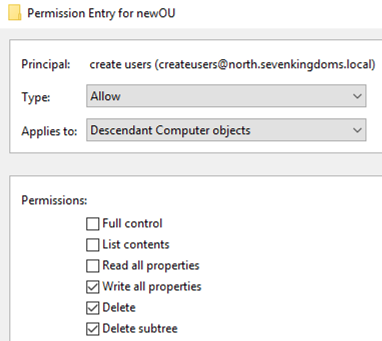
Regardless of method, opening up these permissions introduces the risk of bulk deletion but hey, you’ve got the recycle bin enabled anyway right?
Technical detail
When creating a new empty OU, the deny ACE on that object includes only the “Delete” and “Delete subtree” permissions.
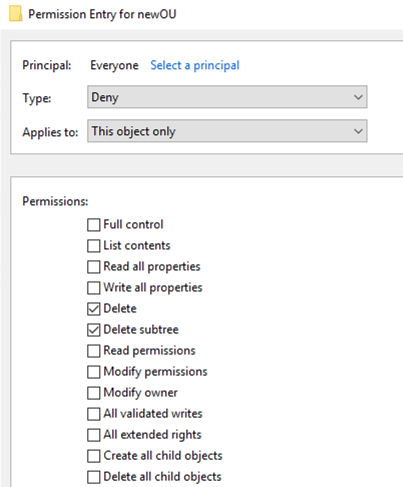
These permissions apply only to protect the OU itself and as a byproduct, prevent accidental deletion of all objects within that OU. However, as soon as any single object within that OU becomes protected, the parent’s deny ACE changes to also include the “Delete all child objects” permission.
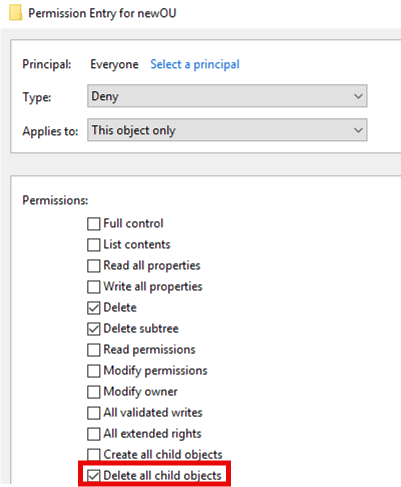
So whenever accidental protection is enabled on an object, it effectively protects all sibling objects (did I just make that up?) within the OU.
Manual removal of the “Delete all child objects” permission will uncheck the accidental protection box for all child objects.
This brings up the question as to why I get these types of errors as a Domain Admin when trying to delete objects specifically marked as protected.
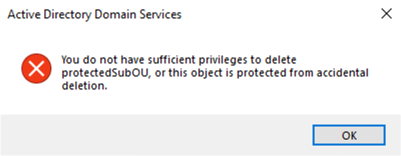
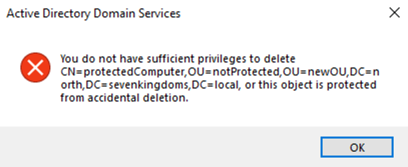
But as a regular user, I get these messages when deleting a sibling object.
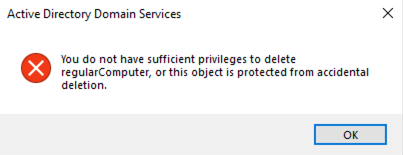
And as a Domain Admin, I can delete sibling objects without pause.
The accidental protection box is directly tied to the Deny ACE as removing the ACE will remove the checkbox. This all tells me that the Deny “Delete” permission actually applies to Everyone and takes precedence over the “Full Control” rights that belong to Domain Admins. Whereas, the “Delete all child objects” permission does not similarly take precedence over allow permissions. This is where my brain breaks and I’m happy to let someone else figure that one out. I got my win for the week. Stay curious friends.